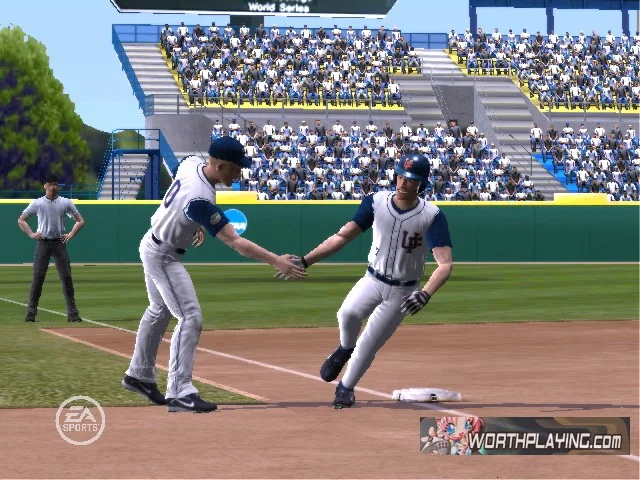
MVP 06 NCAA Baseball is EA Sports' 2006 college baseball game for PlayStation 2 and the original Xbox. Its appeal is running a college program and playing a full team's games, with Load and Fire batting as its signature control change. It is a historical console release, so begin with the edition and hardware rather than expecting a new game with current college rosters.
What MVP 06 NCAA Baseball actually contains
The Michigan State University Libraries catalog identifies the PlayStation 2 edition as a 2006 EA Sports release. The contemporaneous launch announcement describes 128 teams, 19 authentic stadiums and a college-specific Dynasty mode, with versions for PS2 and Xbox. In that announcement, Xbox means the original console generation; it is not the name of a separate native Xbox 360 release.
Those numbers describe what was offered in that game. They should not be compared directly with a current NCAA membership directory as if the two lists were supposed to match. A school missing from an old selection screen has not disappeared from real college baseball, and a licensed program's presence does not make its game roster a current roster.
If following one particular school is your reason to buy, verify that school in the actual edition's team selection. Look at the roster and the available options before assuming that a fan-made update, a renamed save or a screenshot from a different MVP game represents the original disc. The title on the case, the platform and the content you are shown should agree.
EA's January 24, 2006 announcement also documents ESPN integration, including a sports ticker and radio updates for connected users. That is evidence of the launch design. It is not evidence that those connected services still work today. Judge a retro setup first by the game you can play locally, rather than by a decades-old online badge.
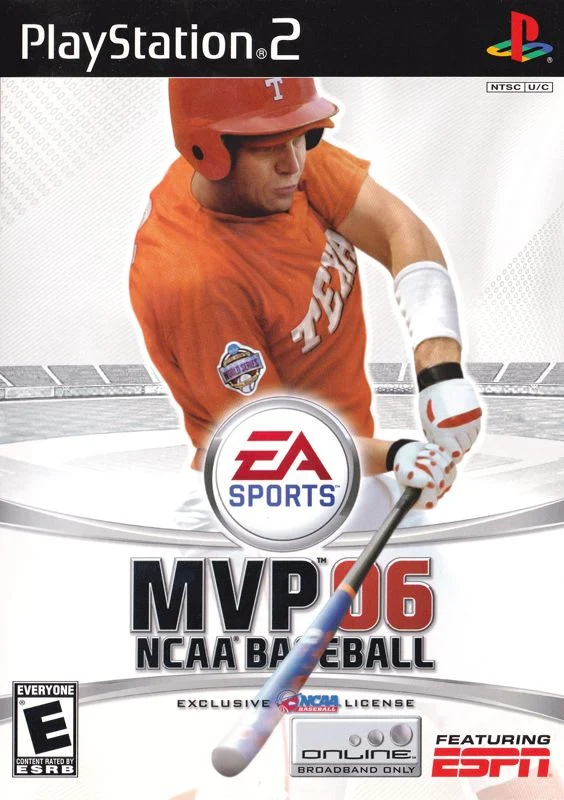
The cover athlete is former Texas player David Maroul, identified in the launch announcement as the 2005 College World Series MVP. His appearance belongs to the game's historical identity. It does not turn the product into a contemporary player-career mode or a new edition whenever college baseball becomes a popular search topic.
The practical choice is therefore about the kind of baseball you want to manage: a whole program, its lineup and its season. Our broader college baseball video games guide compares that experience with modern options. The sections below stay with MVP 06's documented systems and suggest a learning routine; they do not claim new hands-on testing of an original console.
Learn Load and Fire batting before chasing home runs
Load and Fire is the first system to learn if you want to understand what distinguishes this edition. In an interview about MVP 06, developer Ben Brinkman explains pulling the right stick down to load and pushing it forward toward the incoming pitch to fire. Kenny Bartlett's contemporaneous review also notes that loading too briefly or too long can produce weak contact. That gives you several variables to separate before deciding that the hitting system is simply too difficult.
Separate the load, timing and swing direction
A useful starting point is to think of loading and firing as two decisions. The first prepares the swing; the second commits it. If you change both at once, you cannot tell whether better contact came from a more suitable load or from recognizing the pitch earlier. Resist the temptation to make a bigger or more frantic stick movement after every weak ground ball.
For your first session, choose a comfortable view and keep it. Work on recognizing a hittable pitch before experimenting with responding to different pitch locations. A ball outside the area you can handle is not a good test of whether your swing timing has improved. Taking that pitch can be more useful than producing another difficult-to-interpret foul ball.
Forward direction belongs to tracking the pitch. Brinkman's example is a ball down the middle: load back, then push straight forward for contact. Do not interpret the stick as a cursor selecting a landing spot in the outfield. First learn the movement against a pitch you can recognize, then work on adjusting to another location. Changing location, load duration and firing moment together makes it harder to identify what went wrong.
Use a short practice routine to diagnose weak contact
The review identifies a batting mini-game as a place to practice. The following routine is an editorial suggestion rather than a built-in challenge or a report of our own console testing. Start with a group of ten pitches under the same settings. Record how many you deliberately take, how many you miss and how many produce contact you consider solid. Home runs alone are a poor measure because they discard useful progress on ordinary balls in play.
For the next group, change only when you begin the load. Keep your approach to pitch location and pitch-selection rule the same. Then try another group with the original load and an adjusted firing moment. Small, deliberate changes make the result easier to interpret than switching teams, difficulty and controls after each at-bat.
Once contact is reasonably consistent, add a count-based decision: identify which pitches you are willing to attack before the delivery. The aim is to transfer a repeatable movement into an actual at-bat, where declining a poor pitch is part of hitting. Save a short note about the setting and cue that helped so your next session begins with a baseline.
Pitch and defend with the 06 edition's controls
Do not carry every instruction from an MVP 07 tutorial into this game. The original MVP 06 review describes timed-meter pitching and Precision Throwing: point the right stick toward the intended base and control the hold duration for accuracy. It also documents a classic-control option for batting and throwing. These are separate decisions from which pitch to select or where to position a fielder.
That distinction matters after an ugly inning. Missing a release cue, choosing an unsuitable target and throwing to the wrong base produce different problems. Calling all three a control failure makes practice less useful. Begin by identifying what you intended to do, then compare it with what you actually entered.
Learn one repeatable sequence at a time
For pitching, choose a familiar pitch and a conservative target while you learn the meter. Repeat the release sequence before adding more demanding locations. When a pitch misses, ask whether the problem was your selected target or the timing of the input. Keep an eye on the count as well: an attempt to be too fine can create a difficult situation even when no individual pitch looks disastrous.
For fielding, start with the ordinary out. Before the ball reaches the fielder, decide which base is your priority. Then concentrate on a controlled throw rather than treating the stick as a command to throw as hard and as quickly as possible. A rushed attempt at an extra out is less valuable as a learning exercise if you have not yet made the routine play repeatable.
A simple practice sequence is a ground ball, a selected target and one accurate throw. Once comfortable, add a runner and decide whether the same target still makes sense. This turns defensive practice into reading a situation, rather than repeating a movement without knowing why that movement is appropriate.
If the analog system prevents you from enjoying a full game, compare it with the available classic option while keeping the team and other settings constant. Choose a baseline you can use consistently, then return to the unfamiliar system in shorter sessions. There is no need to change every control preference at once, and a guide cannot substitute for checking the actual configuration shown by your edition.
Build a college program in Dynasty
Dynasty is where MVP 06's college setting becomes a management problem. In the developer interview, Brinkman describes year-round recruiting, scouting and scholarship decisions. He also connects coaching-staff development and team goals to recruiting, with NCAA Challenges offering equipment or facility rewards. Georgia Tech's archived EA feature description separately confirms recruiting, stat tracking and performance-linked challenges.
Recruit for the next roster as well as the next game
A practical way to approach a new save is to draw up two lineups: the one you trust now and the one you may need later. This is a planning method, not a hidden game formula. For each position, note your preferred player, the alternative and whether the future looks secure. It makes a weakness visible before you are forced to solve it at the start of another season.
Then give each prospective addition a job. One player may address an immediate hole; another may provide a longer-term option behind an established starter. Recruiting by the most impressive single rating alone can leave the same position crowded while a different part of the roster remains thin. Compare candidates against the role you actually need to fill.
Connect challenges and team goals with that plan. Read the reward and the stated objective before deciding how much attention it deserves. An upgrade relevant to your program can be worth pursuing, but chasing every side objective without a roster priority makes it harder to judge progress. After a stretch of games, revisit whether your original assessment still fits the players you are using.
Keep the historical setting in view. This is not a simulation of today's NIL arrangements or a promise that a current recruiting rule has been implemented. Use the actual in-game information when deciding what an offer means. A modern college-baseball article can explain the sport, but it should not supply invented mechanics for an older game.
Manage pitching across a series and a season
Before a run of games, review the calendar alongside your pitching options. A useful notebook has a planned starter for each upcoming game, the alternatives and a brief record of recent use. Consult the status shown in your own save rather than applying an unsupported universal recovery schedule. The aim is to see tomorrow's problem before making today's substitution.
Imagine a save with several reliable starters but few relief options you trust. Using your preferred reliever whenever an inning becomes uncomfortable can leave you repeatedly searching for the same solution. Decide which situations justify that choice and which give another pitcher an opportunity. This is a strategic framework, not a claim about a particular fatigue calculation.
After a series, compare the plan with what happened. Were too many runners allowed before a change, or did an early change consume options you needed later? Look at the sequence of decisions rather than blaming only the last pitcher on screen. Over a season, that record can tell you which roles deserve recruiting attention and which merely need a more consistent plan.
Decide what changes when you move to MVP 07
The clearest edition difference is pitching. EA's February 6, 2007 release announcement introduces Rock and Fire pitching on the right analog stick, documents 152 playable teams from 16 conferences and identifies PlayStation 2 as the release platform. That announcement also introduces situational pitching advice through Ask Kyle. These are documented additions, not reasons to assume every player will prefer the later game.
| Comparison | MVP 06 | MVP 07 |
|---|---|---|
| Original platforms | PlayStation 2 and original Xbox | PlayStation 2 |
| Announced team coverage | 128 teams | 152 teams |
| Pitching distinction | Timed meter | Rock and Fire analog pitching |
| Cover athlete | David Maroul | Jered Weaver |
For someone starting with an original Xbox setup, platform availability is the first filter. For a PS2 owner comparing both discs, the question becomes whether the later pitching approach and additional team coverage address something they want. A larger number on a feature list does not establish that a particular missing school has been added. Verify the actual team you care about before choosing an edition on that basis.
Control preference is another useful filter. If your interest in MVP 06 is specifically learning its batting while keeping a familiar pitching meter, a different pitching system is a meaningful change to consider. If coordinating both hitting and pitching through analog movements is the experience you are seeking, investigate the 07 system with that objective in mind. Neither preference needs to become a claim that one edition is universally superior.
Keep comparisons tied to an actual copy and configuration. A heavily edited roster or an unusual difficulty setting can change the impression of a video without establishing an edition-wide difference. Ask which game, platform and options produced the example. The table summarizes original product distinctions; it does not promise identical performance across every old console, disc or modern setup.
Set up an honest retro-game plan today
Start with a modest goal: load a local game, use the controls you selected and make a save you can reopen. The library catalog's PS2 record is a useful identification reference, but a catalog entry does not demonstrate the condition of a particular used disc. Likewise, EA's 2006 ESPN announcement establishes historical connected features rather than their operation on your setup today.
Check the copy, hardware and expectations together
When considering a physical copy, ask for photographs of the actual disc label and case rather than relying only on a stock cover. Confirm the edition, platform and region against the console you intend to use. Check the included manual, controller and save arrangements. If your plan involves different hardware from the original release platform, verify that particular arrangement separately; this guide does not promise modern-console or emulator compatibility.
A useful demonstration goes beyond reaching the title screen. Ask whether the copy can enter a game and whether a save can be loaded on the intended setup. That does not eliminate every possible fault, but it is more relevant to a long Dynasty than the appearance of the packaging alone. For equipment you already own, establish that baseline before spending an evening configuring rosters.
Keep original content and later changes separate in your notes. A renamed roster, a fan update or a saved custom team may be enjoyable, but it answers a different question from what the original disc contains. When you seek help, state the edition and what has been changed. That makes a control problem or missing-team question much easier for another player to interpret.
Finally, choose a realistic first session. Practice a short group of at-bats, make routine defensive plays and finish one game before starting a long program rebuild. If those basics suit you, Dynasty supplies a reason to keep making decisions beyond the next pitch. MVP 06 is most interesting when its historical college setting and particular control systems are the experience you want, with expectations grounded in the game you actually have.
Join the conversation
Share a question or a thought about college baseball. Comments are reviewed before they appear. Keep it friendly and on topic.
No comments yet. Start the conversation.
Sign in with Google to leave a comment. Your email address is not displayed.